
Imagine turning a stack of dry PDFs, lecture notes, or YouTube transcripts into a Hollywood-style trailer. Sounds like science fiction, right?
Well, welcome to 2024. Google’s experimental AI notebook, NotebookLM, just changed the game. While everyone is using ChatGPT to write emails, creators are using NotebookLM cinematic video overviews to build stunning visual stories.
But how does it work? Is it free? And can it really beat tools like Gemini or ChatGPT?
Let’s dive in. No robotic AI talk. Just practical, human advice for YouTubers, students, and marketers.
What is NotebookLM? (And Why Should You Care?)
First, let us answer the basic question: what notebook lm actually is.
NotebookLM (LM stands for Language Model) is Google’s “AI-first notebook.” Think of it as a super-smart research assistant that only talks about your documents. Unlike ChatGPT, which guesses answers from the whole internet, NotebookLM is source-grounded.
How NotebookLM works is simple:
- You upload sources (PDFs, websites, Google Docs, slides).
- The AI reads only those sources.
- You ask questions, get summaries, or generate new content.
It never hallucinates random facts. It sticks to the script you gave it. This makes it perfect for students verifying citations and marketers keeping brand voice consistent.
But the killer feature? The one nobody saw coming? Audio and video overviews.
NotebookLM Cinematic Video Overviews: The New Creative Frontier
Here is the exciting part. Recently, users discovered that NotebookLM’s “Audio Overview” feature (which generates a podcast-like discussion between two AIs) can be pushed further. Much further.
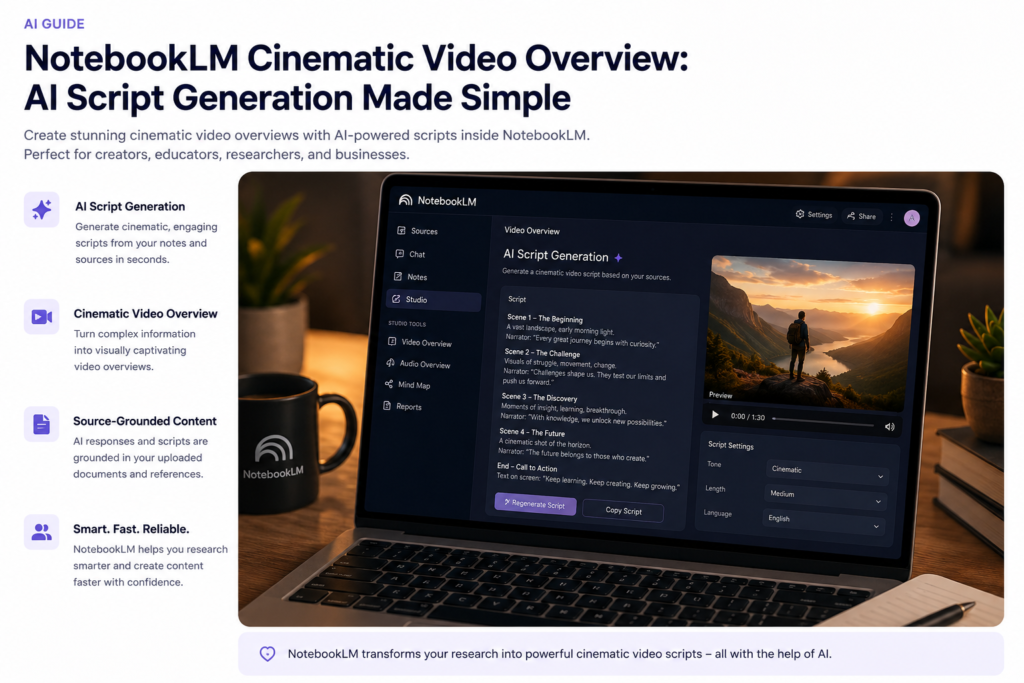
NotebookLM cinematic video overviews refer to using the AI’s deep understanding of your narrative to script, storyboard, and describe visuals for a video, then using AI video generators to bring it to life.
How to Create One (The Workflow)
You don’t need a film crew. You need a workflow.
- Source Upload: Feed NotebookLM your material (a blog post, a historical document, a business plan).
- Generate the Script: Ask NotebookLM to write a “cinematic, high-energy video script” or “storyboard with shot types.”
- Extract the Voiceover: Use NotebookLM’s built-in Audio Overview to generate a realistic dialogue or narration.
- Visual Generation: Take the descriptions (e.g., “Close up of rusty gears turning”) and paste them into AI video tools like Runway Gen-2 or Pika Labs.
- Edit: Stitch it together.
Use Cases:
- YouTubers: Create “Trailers” for your faceless history or tech channels.
- Students: Turn a research paper into a 3-minute video explanation for a class project.
- Marketers: Convert a white paper into an emotional brand story.
- Researchers: Summarize a clinical trial into a visual report.
Features: More Than Just Video
While the cinematic videos are sexy, the engine under the hood is solid. Here is what you get right now.
1. Source Grounding
You upload up to 50 sources (each up to 500,000 words). That is like uploading the entire “Lord of the Rings” trilogy. NotebookLM reads it all instantly.
2. Inline Citations
When it answers a question, it shows you the exact quote from your source. No more “trust me, bro.”
3. NotebookLM Audio Overviews
This is the secret sauce for video creators. It generates a two-host “deep dive” podcast. The voices sound incredibly human (with “ums” and “likes”). You can download this audio to serve as the voiceover for your cinematic video.
4. Accessibility
- NotebookLM Android: You can access it via Chrome on your Android phone perfectly.
- NotebookLM download for PC: There is no desktop app yet (it runs in the browser), but you can pin the notebooklm website to your taskbar for app-like behavior.
- NotebookLM logo: You will see the distinctive LM mark in your Google Apps menu.
NotebookLM Pricing: Is It Free?
This is the million-dollar question. Is NotebookLM free?
Yes. As of today, NotebookLM pricing is $0.
Google has not launched a paid tier yet. However, given the compute power required for the audio overviews, many speculate NotebookLM Pro is coming. The Pro version will likely include:
- Longer audio overviews.
- Higher quality video rendering.
- More sources per notebook.
Warning: Because it is experimental, features change. Use it now while it is hot and free.
NotebookLM API: Can Developers Build On It?
Creators want to know: notebooklm api – does it exist?
Officially, no. Google has not released a public NotebookLM API.
Right now, it is a standalone product. However, developers are watching closely. When the API drops (likely in 2025), expect automations like:
- Auto-uploading daily news PDFs to generate a video summary.
- Integrating NotebookLM analysis into Zapier workflows.
- Building custom front-ends for corporate training.
Until then, you must use the web interface or the mobile browser version. in this post, we are learning about NotebookLM Cinematic Video techniques.
NotebookLM vs. The Giants (Comparisons)
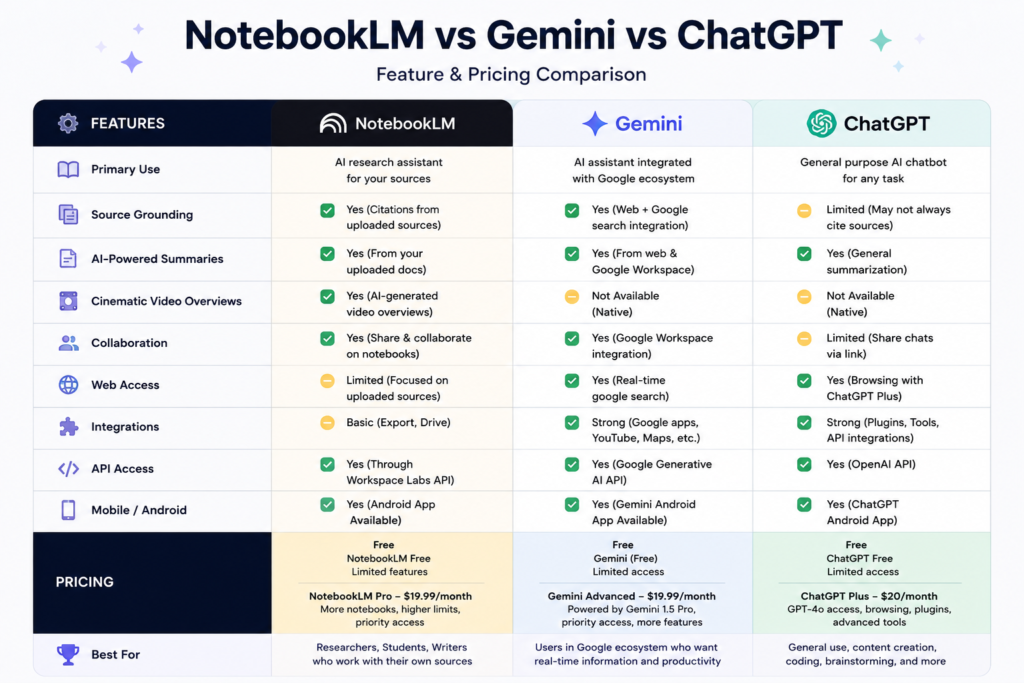
You are probably wondering how this stacks up to the competition. Let’s break it down.
NotebookLM vs Gemini
Both are Google products. So, what gives?
| Feature | NotebookLM | Gemini |
|---|---|---|
| Source Grounding | Extreme (Only your docs) | Low (General web data) |
| Truthfulness | High (Citations provided) | Medium (May hallucinate) |
| Video Support | Yes (Scripting + Audio) | Yes (Gemini 1.5 Pro vision) |
| Best For | Research & Long-form docs | General Q&A & Coding |
Verdict: Use Gemini for brainstorming. Use NotebookLM for verified facts that go into your video scripts.
NotebookLM vs ChatGPT
OpenAI’s ChatGPT is the king of chat, but how does it handle cinematic video overviews?
| Feature | NotebookLM | ChatGPT (GPT-4o) |
|---|---|---|
| Context Length | 50M tokens (Massive) | 128k tokens |
| File Uploads | Google Docs, Web URLs | Images, Text, Code |
| Voice Quality | Unreal (Podcast style) | Robotic (Standard TTS) |
| Pricing | Free (Currently) | $20/month for Plus |
Verdict: ChatGPT is a better generalist. NotebookLM is a specialist for turning your specific documents into cinematic audio.
NotebookLM vs Notion
Notion is the productivity darling. But notebooklm vs notion is an unfair fight.
| Feature | NotebookLM | Notion AI |
|---|---|---|
| Primary Use | Research Synthesis | Note-taking & Wikis |
| Audio Output | Full Podcasts | None |
| Source Limit | 50 sources (Massive) | Unlimited pages (Context limited) |
| Video Scripting | Excellent (Cinematic tone) | Good (Standard blog tone) |
Verdict: Keep Notion for your databases and project management. Use NotebookLM to write the deep scripts for your YouTube videos.
Top NotebookLM Alternatives (NotebookLM Like Tools)
Not everyone has access to Google’s experimental labs. If you are looking for notebooklm alternatives, try these notebooklm like tools:
- Claude AI (Anthropic): Best for long context (100k+ tokens) and analyzing massive PDFs. Great for research, but no audio overview.
- Perplexity AI: Excellent for web research with citations. Better for live data, worse for private documents.
- Obsidian AI (with Copilot): For the privacy nerds. Local storage, markdown notes, and AI plugins. Very manual setup.
- ElevenLabs (for audio): If you just want the voice, ElevenLabs is the best text-to-speech, but it lacks the “research” side.
Pros and Cons of NotebookLM
Let’s be honest. It isn’t perfect.
Pros ✅
- It’s free. (For now).
- Zero hallucinations. The citations are magic for students.
- Podcast feature. Best AI voices on the market.
- Google integration. Works flawlessly with Drive.
Cons ❌
- No mobile app. (NotebookLM android is just a browser wrapper).
- No API. You cannot automate it yet.
- Experimental. Google might kill it (RIP Google Reader).
- No direct video rendering. It writes scripts; you still need a video editor.
How to Get Started (Step-by-Step)
Ready to make your first NotebookLM cinematic video overview?
- Visit the notebooklm website (notebooklm.google.com).
- Sign in with your Google account.
- Click “New Notebook.”
- Add sources. Drop a YouTube transcript link or a PDF.
- Click “Generate” > “Audio Overview.”
- Wait 5 minutes. Download the MP3.
- Ask the chat: “Write a cinematic video script based on the audio overview.”
- Copy the scene descriptions into an AI video generator.
- Edit. Use CapCut or DaVinci Resolve.
- Upload to YouTube. Done.
Beginner Tip: Don’t ask for “a summary.” Ask for “a Michael Bay style action movie trailer script explaining quantum physics.” Be specific.
FAQs
1. Is NotebookLM free?
Yes, NotebookLM is currently completely free to use. There is no paid tier yet, though a “NotebookLM Pro” is rumored.
2. Does NotebookLM have an API?
No, Google has not released a public NotebookLM API. Developers must use the web interface for now.
3. Can NotebookLM create videos directly?
No. It creates cinematic video overviews by writing scripts and generating audio. You must use other AI tools (like Runway or Pika) for the visuals.
4. Is NotebookLM available on Android?
There is no dedicated app, but the notebooklm android experience is perfect via the Chrome browser. You can install the notebooklm website as a Progressive Web App (PWA).
5. Can I download NotebookLM for PC?
There is no notebooklm download for pc executable. It is a web-based tool. Access it via any browser.
6. What is the NotebookLM logo?
The logo is a stylized “LM” (Language Model) in Google’s four colors (Blue, Green, Yellow, Red).
7. What are the best NotebookLM alternatives?
The best notebooklm alternatives are Claude AI for research, Perplexity AI for web citations, and ElevenLabs for voice synthesis.
8. NotebookLM vs ChatGPT: Which is better for students?
For verified citations from your textbooks, NotebookLM is better. For general homework help, ChatGPT is better.
Conclusion: Is NotebookLM the Future of Storytelling?
Let’s wrap this up.
NotebookLM cinematic video overviews are not a gimmick. They solve the biggest problem in AI content creation: Context.
ChatGPT forgets what you said five minutes ago. NotebookLM remembers the 500,000-word document you uploaded yesterday. The audio overview feature is so good that it has sparked a new genre of “AI podcasting.”
The notebooklm pricing is unbeatable (free), and while the notebooklm api is missing, the manual workflow is powerful enough for most creators.
Final Verdict: If you are a YouTuber tired of writing scripts, or a student who hates reading 100-page PDFs, use NotebookLM today. It turns the boring into the blockbuster.
The future of AI research assistants is not just answering questions. It is showing you the movie. i hope this post will help you to know about NotebookLM Cinematic Video. Please share this post with your friends.
You can also check our other blog post
Sarvam AI India’s Answer to Sovereign AI? Models, API & Careers 2026
Hugging Face AI: Master Models, APIs & Image Generation
ElevenLabs AI Voice Tools: A Complete Guide for Creators
Durable AI Website Builder: Features, Pros/Cons, Pricing, and Best Use Cases